


Competencies
Initial Architecture
User Research
Stakeholder Interviews
Interaction Design
Product Discovery
Workflow Definition
Asset Delivery
CollegeBoard
Competencies
Initial Architecture
User Research
Stakeholder Interviews
Interaction Design
Workflow Definition
Product Discovery
Asset Delivery
Reimagining ACES for Higher Ed
Partnership Context
How user-focused design helped an education leader transform their digital platform
The College Board provides tools and services that help higher education institutions make data-informed decisions about admissions, placement, and student success. One of those tools, the Admitted Class Evaluation Service (ACES), allows universities to submit data and receive studies that connect admissions factors—like test scores and GPA—to actual outcomes.
ACES is trusted by institutions nationwide. But its platform experience was falling behind. College Board was receiving consistent feedback from admissions teams and institutional researchers: the submission workflow was hard to follow, inconsistent, and easy to get wrong. Flying Circle was brought in to redesign the ACES experience—making the full submission process easier to navigate, more transparent, and more aligned with the real-world needs of higher education teams.
Challenge for Maintaining Context
Submission workflows were too rigid and generic
Users were dropped into a workflow without context. There was no sense of where they were in the process, what steps came next, or whether their data had been received. This lack of orientation led to frustration, delays, and, in many cases, incomplete submissions.
Solution to Changing States
ACES is trusted by institutions nationwide. But its platform experience was falling behind. College Board was receiving consistent feedback from admissions teams and institutional researchers: the submission workflow was hard to follow, inconsistent, and easy to get wrong. Flying
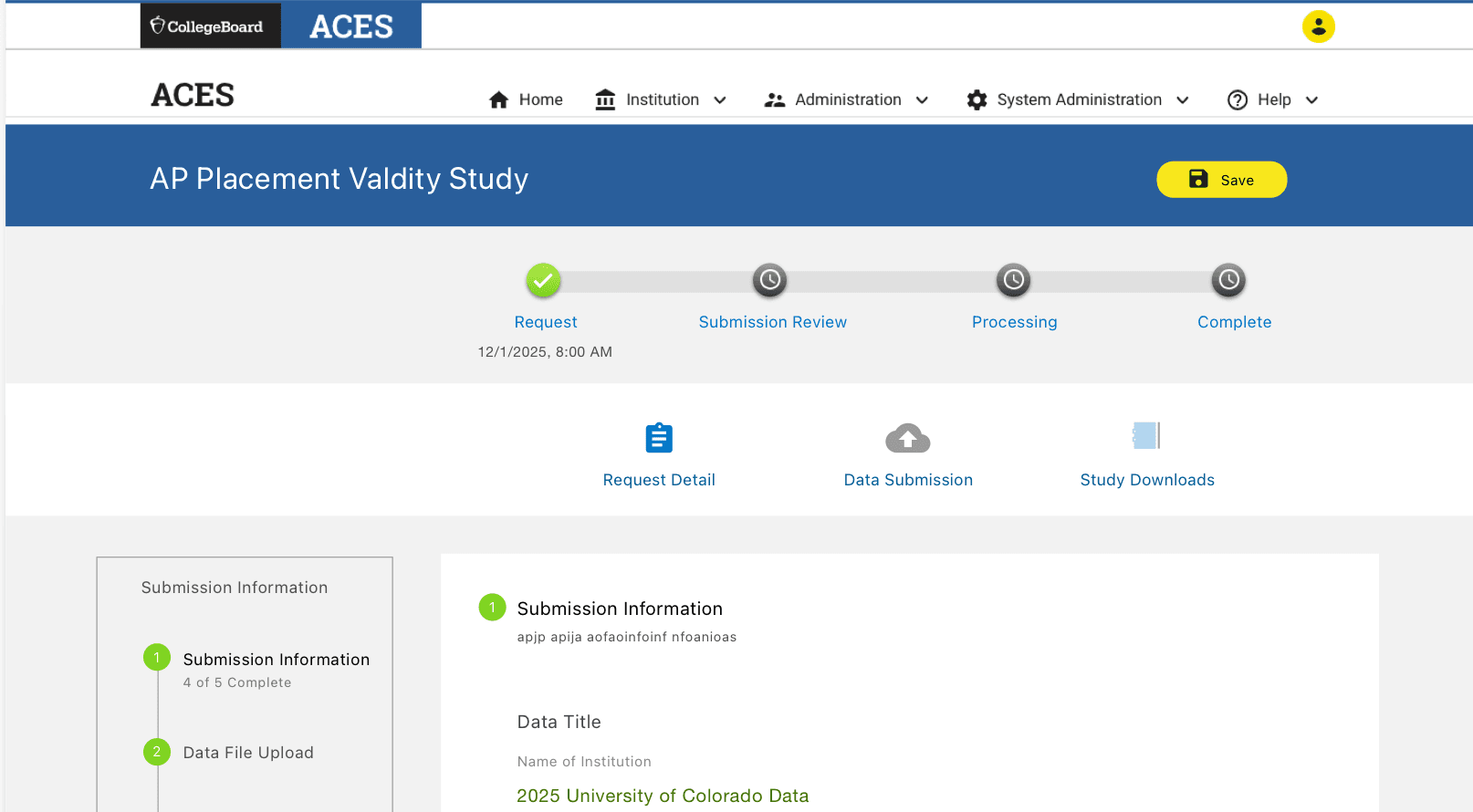
Outcome of Visual Indicator
Dramatic Reduction in Submission Errors
Administrators now move through ACES with clarity and confidence. The process navigation quickly became the most praised feature in usability testing and significantly reduced reliance on email updates and help desk support.
Challenge to Confusing Connections
Simplifying Term Mapping
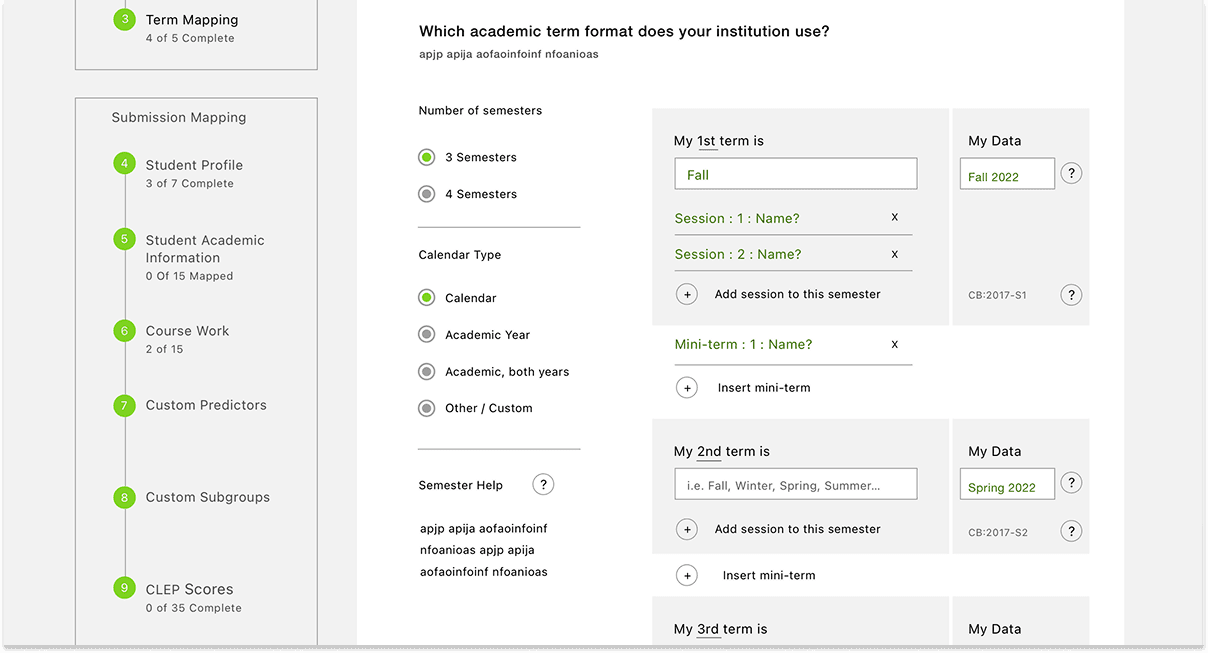
Each ACES study type—such as placement validation or predictive modeling—had different requirements, but the legacy interface treated them all the same. This forced users to interpret field labels and sequences that didn’t always apply, increasing confusion and error rates.
Solution
We replaced the table-heavy interface with a visual term-mapping tool. Users could now select from clear, illustrated calendar types—such as 2-term or 3-term systems—and the interface adjusted accordingly. Plain-language labels and descriptions made it easier to move forward with confidence.
Outcome
Term mapping became a quick, intuitive step rather than a source of confusion. Submission errors decreased, and administrator satisfaction with this section dramatically improved during usability testing.
Challenge to Overwhelming Options
Managing Large Data Uploads
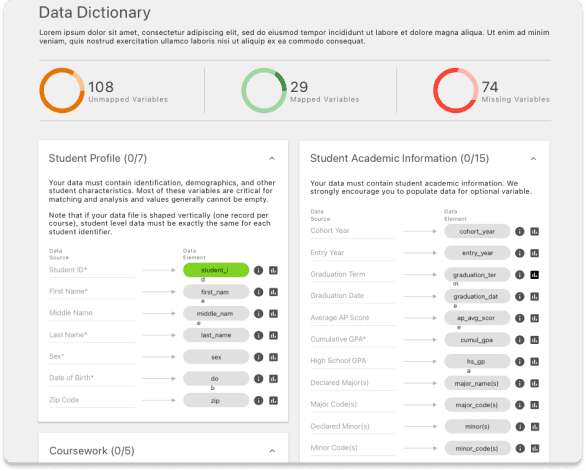
Submitting large datasets often meant working with hundreds of fields across multiple categories. The legacy interface presented everything at once with minimal structure, making it hard to see where errors occurred or whether data was valid.
Solution
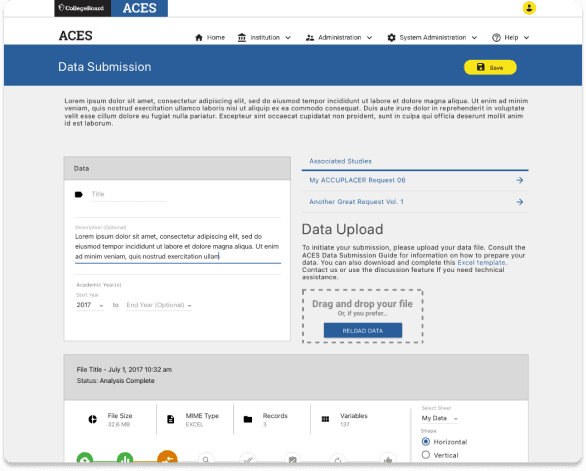
We introduced collapsible field groups, inline validation feedback, and visual field status indicators (green for complete, red for error, gray for unused). Uploads could now be reviewed step-by-step, with confidence-building previews and confirmations throughout.
Outcome
The redesigned data dictionary process gave users the control they needed. Institutions could now submit with fewer mistakes, delegate across teams more effectively, and avoid unnecessary resubmissions.
Status Challenge
Tracking Study Progress
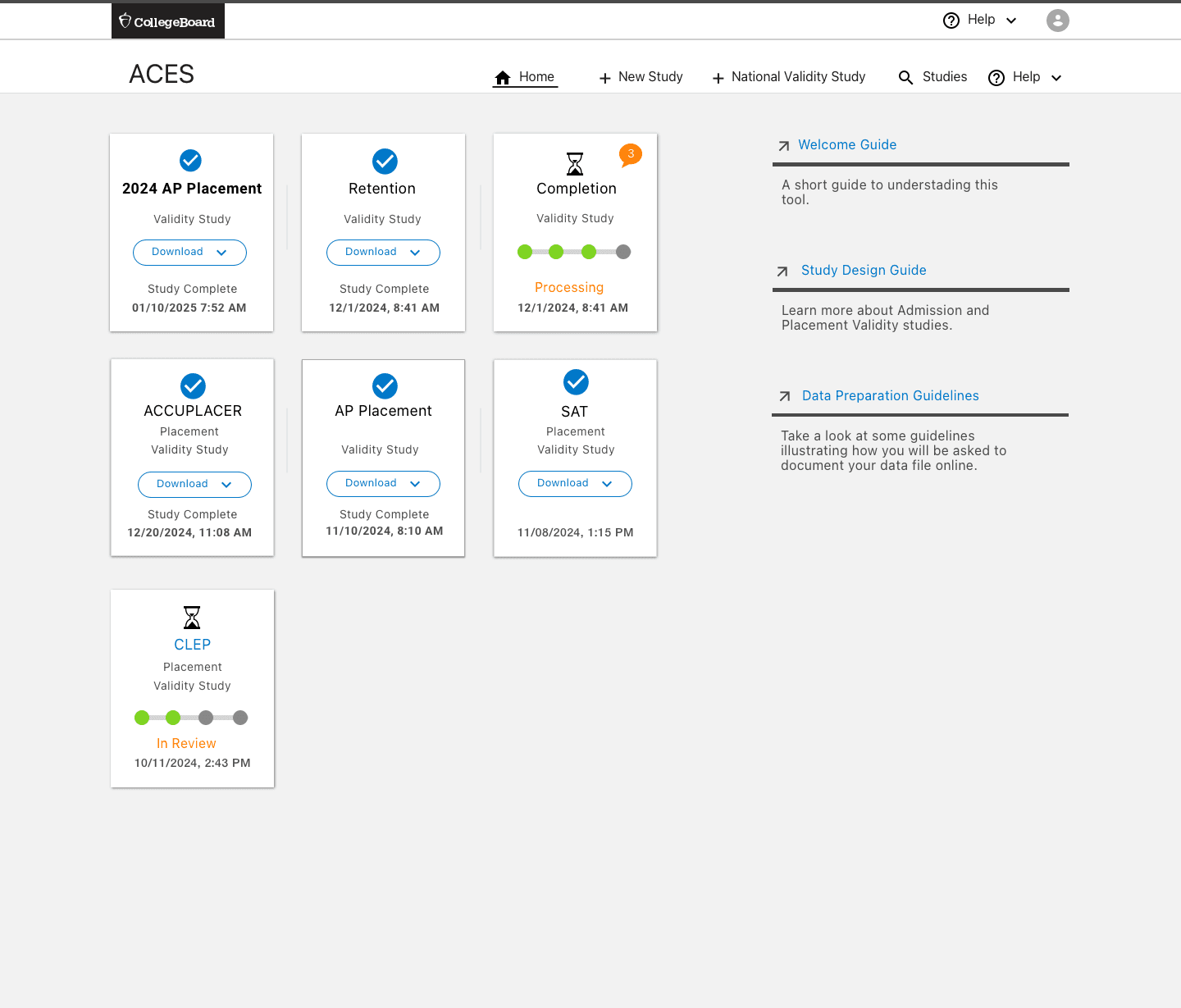
Once a study was submitted, users had no visibility into whether it was received, reviewed, or needed revisions. Most updates were delivered via email and lacked context, leaving users unsure of what to do next.
Solution
We designed a dashboard using card-based views for each active or completed study. Each card displayed the current state—Needs Feedback, In Review, Complete, or Draft—and included direct links to the next step or reviewer messages.
Outcome
Users now have a reliable command center for all their ACES activity. The dashboard has reduced confusion, improved transparency, and brought a sense of control to institutions managing multiple ongoing submissions.
Tracking Study Progress
Once a study was submitted, users had no visibility into whether it was received, reviewed, or needed revisions. Most updates were delivered via email and lacked context, leaving users unsure of what to do next.
See the success of the Flying Circle approach







See the success of the Flying Circle
approach to
approach to