

Oak Ridge National
Laboratory
Competencies
Initial Architecture
User Research
Stakeholder Interviews
Interaction Design
Workflow Definition
IA, Taxonomy
Prototyping
Oak Ridge National
Laboratory
Competencies
Initial Architecture
User Research
Stakeholder Interviews
Interaction Design
Workflow Definition
IA, Taxonomy
Prototyping
Partnership Context
Empowering Scientific Discovery with a Flexible, Research-Centric Platform
for Global Population Data
for Global Population Data
In today's data-driven world, research organizations like Oak Ridge National Laboratory (ORNL) use
complex datasets for insights in policy, urban planning, and environmental initiatives. ORNL's GIST
group needed a flexible system for analyzing global population density, as current tools were
rigid. ORNL required an adaptable, powerful solution for precise data capture, modification, and
analysis.
complex datasets for insights in policy, urban planning, and environmental initiatives. ORNL's GIST
group needed a flexible system for analyzing global population density, as current tools were
rigid. ORNL required an adaptable, powerful solution for precise data capture, modification, and
analysis.
Prepare Data 90% Faster
Flexible, column-driven entry and real-time completeness scoring cut data-gathering time in half.
Uncovers Insights 3× Quicker
One-click temporal badges and interactive maps let researchers spot density patterns instantly.
Built-in Data Trust
Inline source citations and PDT % completeness indicators ensure every record is publish-ready.
Initial Challenge
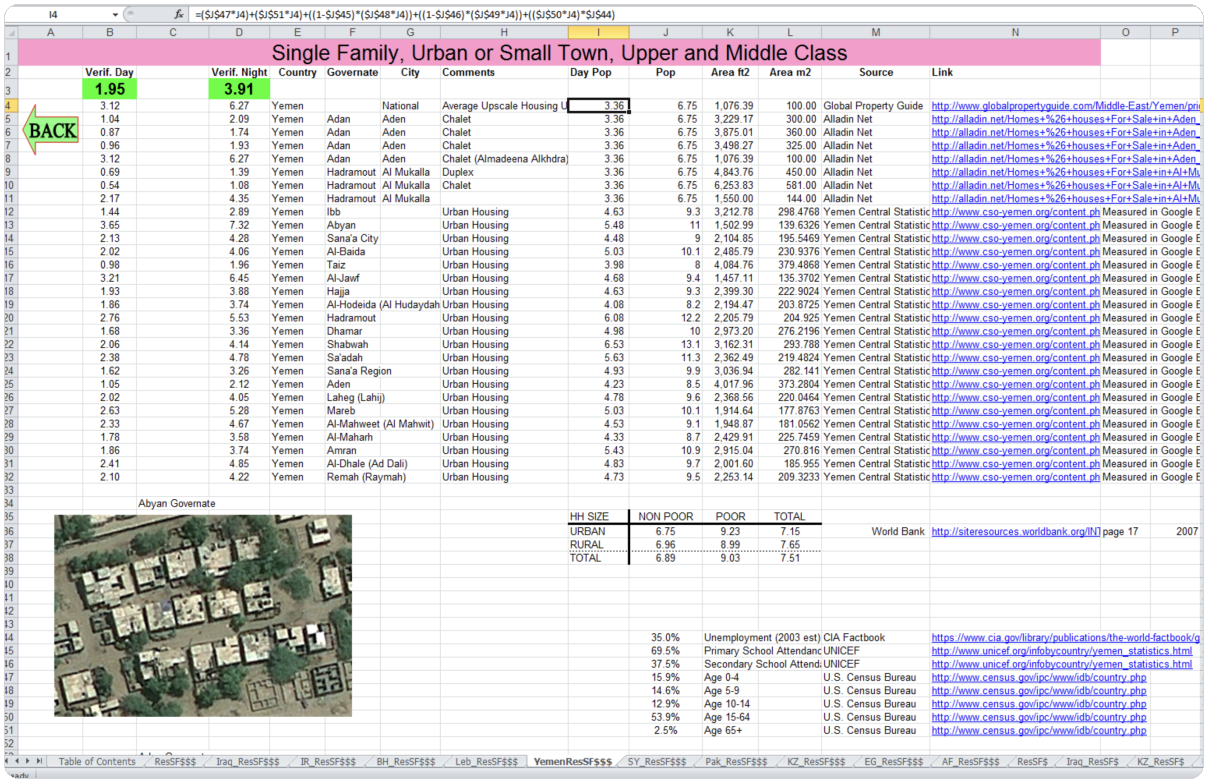
The project started with a spreadsheet from the GIS team. We used it to find key insights for the application.
ORNL's scientists faced challenges in managing global population density data, as insights developed over time. They required the flexibility to adjust their work without rigid structures.
Current content management systems create challenges by requiring strict data entry sequences and not allowing partial saves or highlighting incomplete data. This rigidity causes inefficiencies, bottlenecks, and inaccuracies, hindering the team's seamless workflow. Without a flexible, research-focused platform, ORNL’s scientists experience longer timelines, reduced precision, and difficulties in providing timely insights necessary for policy and planning.
Solution to ...
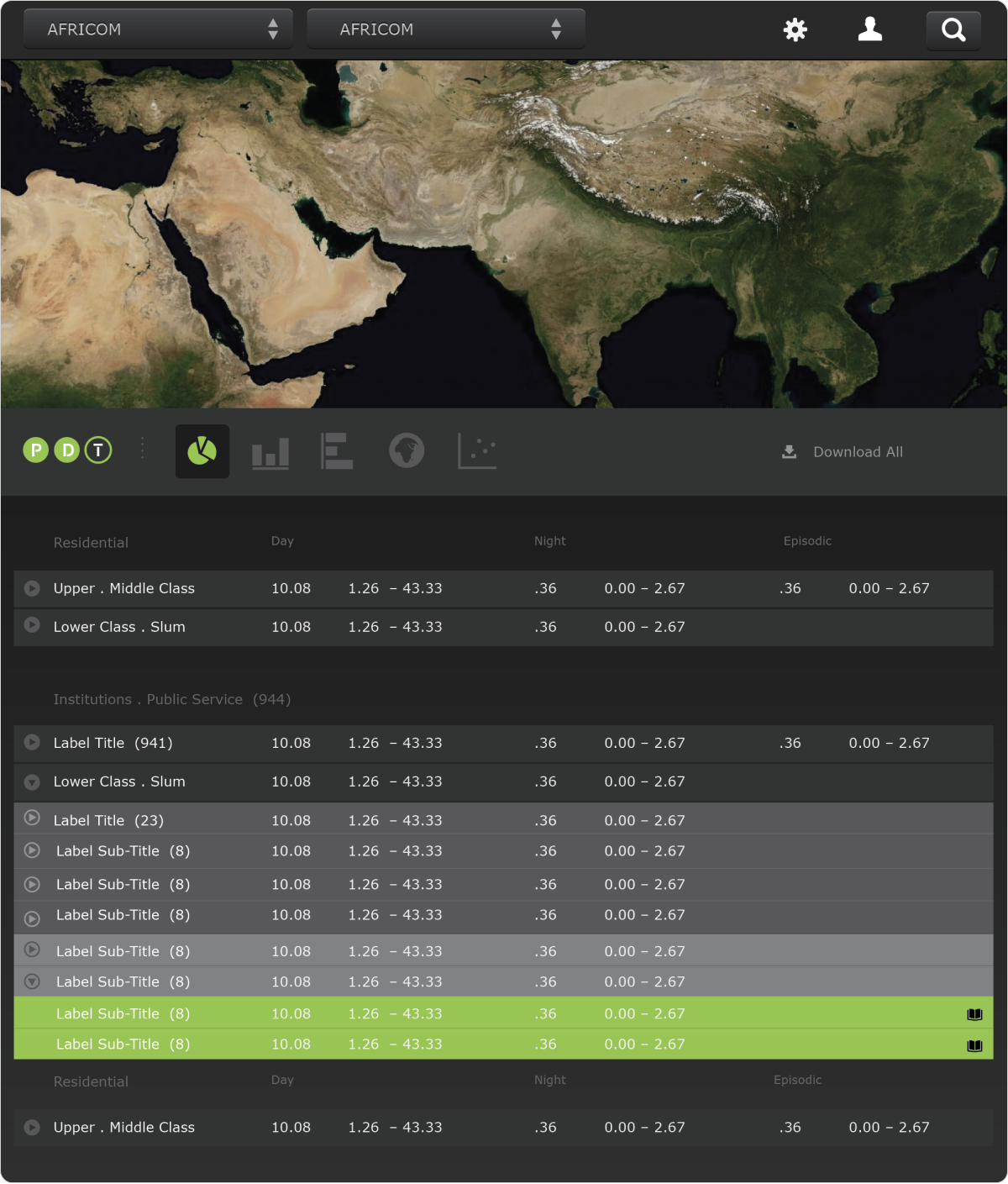
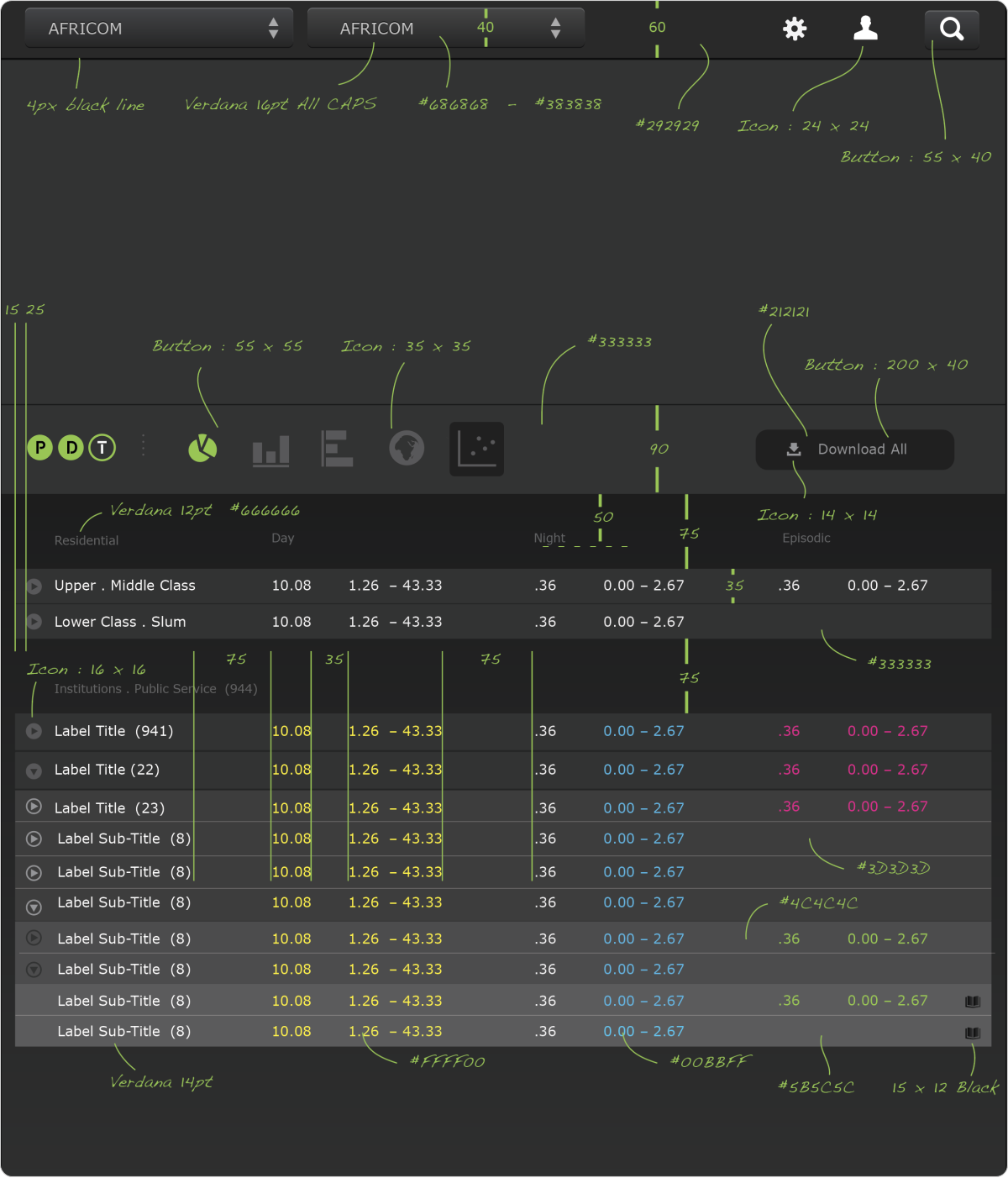
Create a working model to gain feedback from researchers
Researchers would benefit from a more intuitive environment. We created a workspace with real-time data visualizations on a dashboard, equipped with tool panels for geography, time, and attributes.
Outcome of New Workspace Design
Proof of Concept
The tool panels helped researchers quickly adjust visualizations and explore detailed information about geographic locations, time ranges, and attributes. They were pleased with the new workspace's potential, making it a user-friendly research tool for broader sharing.

Initial Challenge
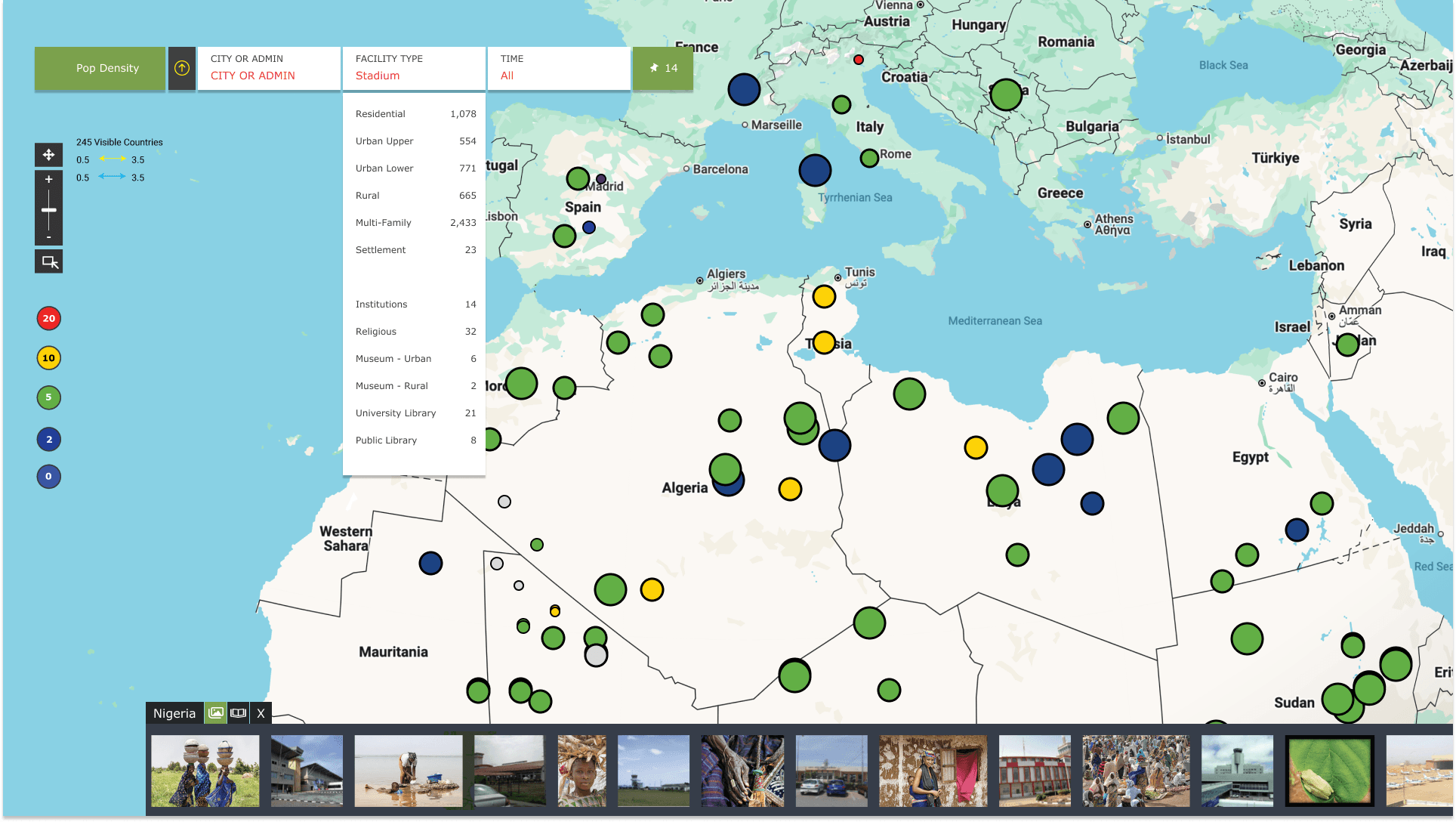
Complex GIS Visualization Needs
ORNL researchers needed more than static tables—they required an interactive, map-centric interface to explore population density by facility type, region, and time of day. Traditional dashboards couldn’t surface spatial patterns or let scientists filter dozens of categories on the fly. Without a tailored GIS UX, critical insights risked hiding in plain sight.
Solution to ...
Interactive, Filterable Map Interface
- Facility Filters: Instantly highlight stadiums, hospitals, or multi-family units without losing map context.
- Scaled Markers: Population-driven sizes and a green-to-blue palette reveal density patterns at a glance.
- Map Controls & Imagery: Pan/zoom tools, live country count, and a geo-tagged photo carousel add spatial and visual context.
Outcome of New Workspace Design
Accelerated Spatial Insight & Decision-Making
- Rapid Hotspot Detection: Facility-specific density patterns emerge in seconds, not hours.
- Enhanced Context: On-map imagery enriches raw data with field-level perspective.
- 90% Faster Analysis: Real-time filters and map updates remove manual exports, slashing turnaround time.
Initial Challenge
Unifying Multi-Dimensional Demographics
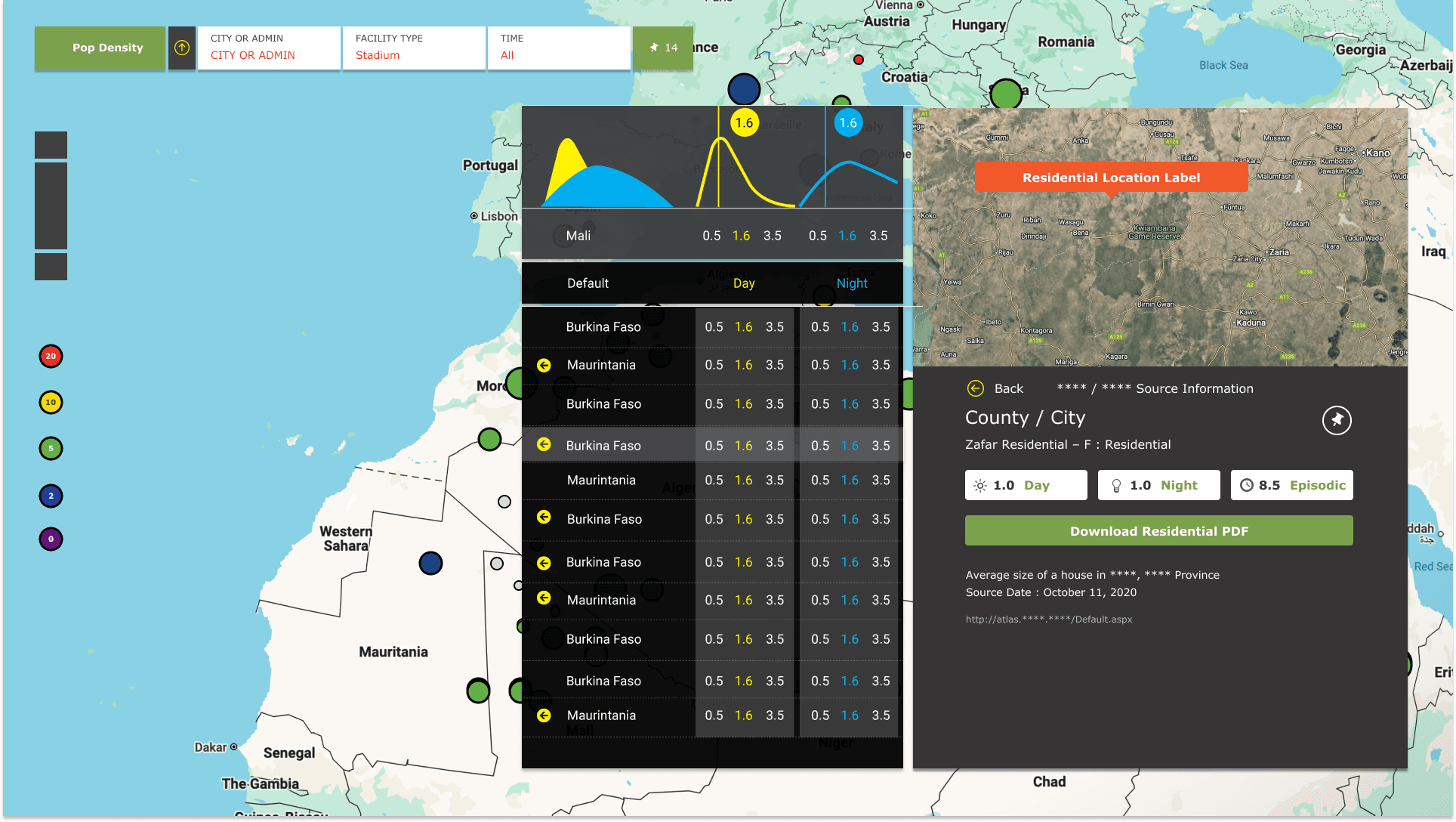
Researchers needed more than raw counts—they required instant breakdowns by age cohort, gender, urban vs. rural status, growth rates, and poverty metrics. Pulling these disparate data points into a coherent view was slowing analysis and obscuring critical insights about population segments.
Solution to ...
Embedded Demographic Insights Panel
- Age Groups: 0–14 | 15–64 | 65+ percentages by gender
- Legended Charts: Facility and time-of-day bars keyed to the map
- On-Tap Metrics: Population | Urban % | Growth | Poverty
- Export Grid: Location, facility, Day/Night/Episodic + one-click XLS
Outcome of New Workspace Design
Seamless Deep-Dive & Rapid Validation
- 3× Faster Insight: Detailed metrics surface with one click—no external lookups—accelerating hypothesis testing.
- Greater Confidence: Immediate access to source citations and completeness scores boosts trust in each data point.
- Unbroken Workflow: Scientists stay in “discovery mode,” moving from macro patterns to micro details without bouncing between screens.
Initial Challenge
Surface Detailed, Context-Rich Data On Demand
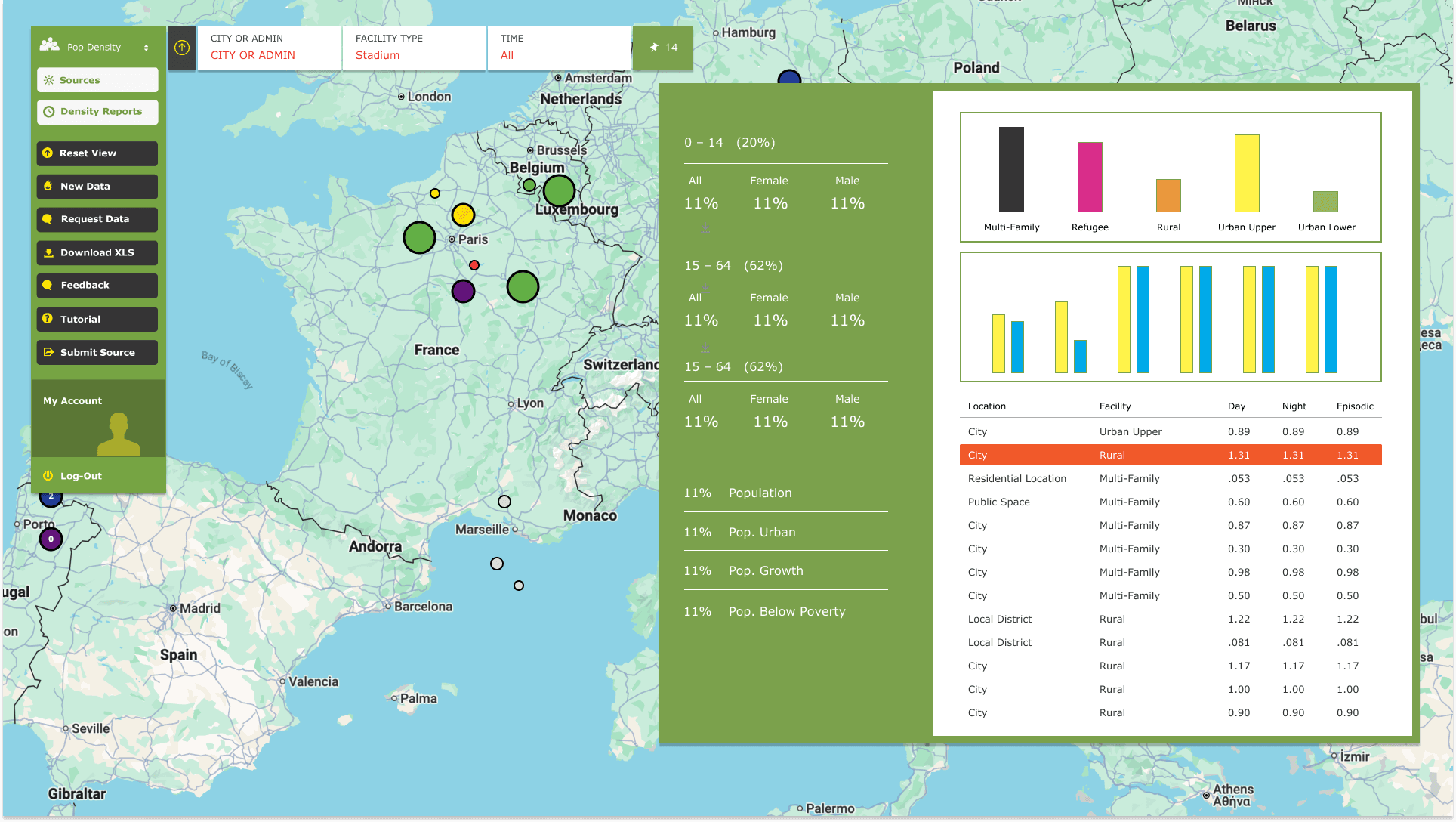
Once a density hotspot is identified, researchers needed immediate access to the underlying metrics—Day, Night, and Episodic values—plus source provenance and contextual visuals. Traditional GIS widgets forced extra clicks or manual lookups, breaking the flow of exploration and delaying insight.
Solution to ...
In-Context Drill-Down Panel
- Temporal Badges: Day, Night, and Episodic counts display as clear badges for instant context.
- Embedded Charts: Mini time-series curves sit atop the panel, showing distribution peaks without switching views.
- Built-In Sources & Download: Source details and a “Download PDF” button live together for quick validation.
- Scroll-Through Records: A single, scrollable list surfaces all related entries without leaving the map.
Outcome of New Workspace Design
Holistic Population Profiles in Seconds
- Age Cohorts: 0–14, 15–64, 65+ show total, female, and male percentages at a glance.
- Color-Coded Charts: Bar graphs map facility distributions and time-of-day shifts to match map legends.
- Tappable Metrics: “Population,” “Pop. Urban,” “Pop. Growth,” and “Pop. Below Poverty” reveal deeper data on tap.
- Exportable Table: A scrollable grid pairs location, facility, and Day/Night/Episodic values with one-click XLS download.
Challenge to Working with Large Data-Sets
Data Dependency & Completeness
The PDT framework hinged on having robust, end-to-end datasets, yet ORNL’s GIST team often worked with partial inputs. Even when a single field was missing, attempts to publish led to failed exports and lost time as scientists chased down missing metrics. Compounding this, related fields across the same record could be incomplete in unpredictable ways—making it impossible to know at a glance which entries were research-ready and which needed further data.
Solutions to Publishing Scientific Data
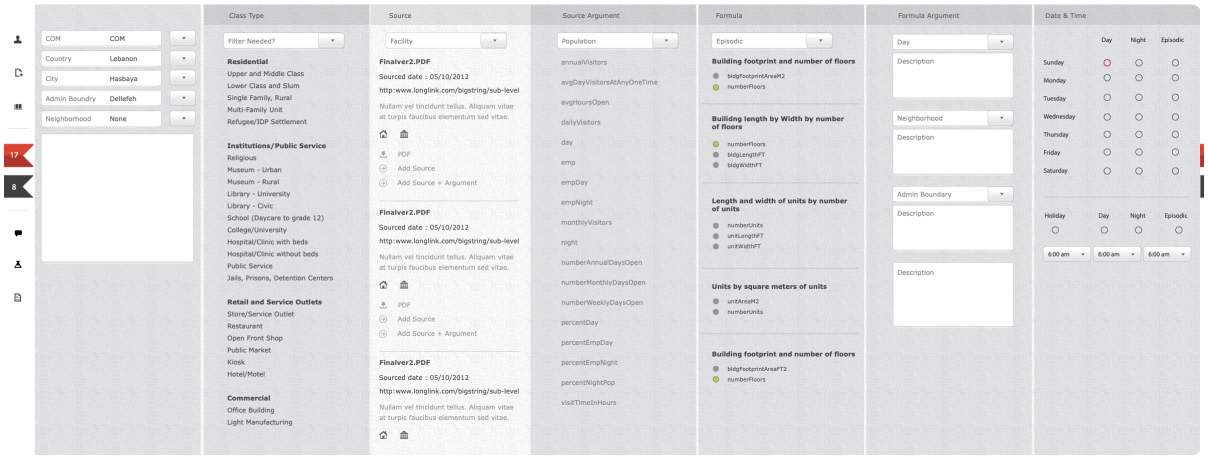
Custom, Column-Driven Non-Linear CMS
Flying Circle designed a bespoke CMS that mirrors the scientific discovery process:
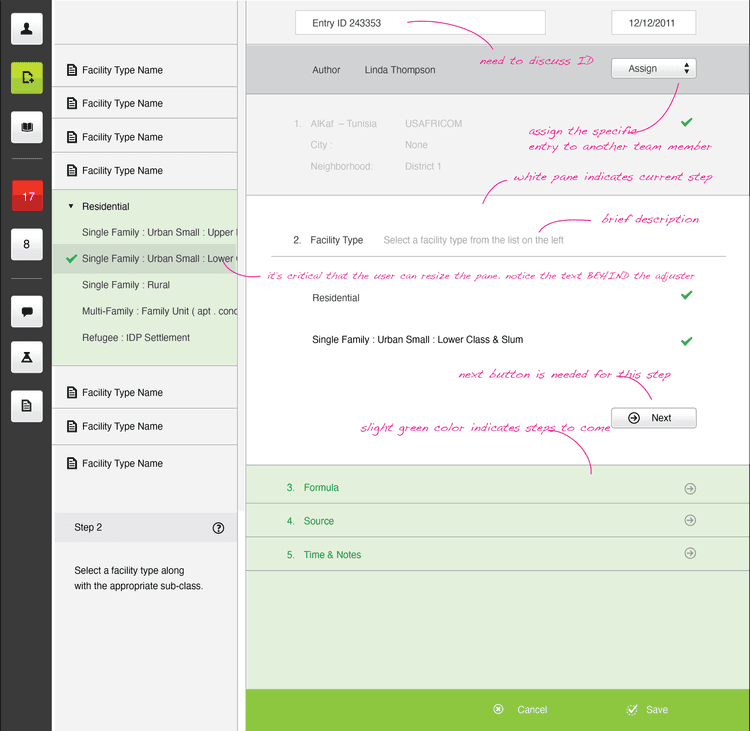
1. Column-Based Workflow Each logical step (source selection, data tagging, population metrics, area calculations, date/time settings) lives in its own vertical column—enabling scientists to jump directly to the fields they’re ready to populate.
2. Dynamic Field Activation Dependent fields remain disabled until their prerequisites are met. Once active, related inputs glow yellow to show context, while green highlights confirm selections—guiding researchers through complex dependencies without confusion.
3. PDT % Completeness Engine Behind the scenes, the CMS feeds into a completeness calculator. As data flows in, the system auto-computes a PDT % score for each record, letting scientists know instantly which entries are ready for publication and which require follow-up.
“This is amazing - you’ve captured our scientific process in a way I’ve never seen before. We should apply for a patent.”
Budhu Bhaduri - Director of Science, Programs, and Partnerships National Security Sciences at Oak Ridge National Lab
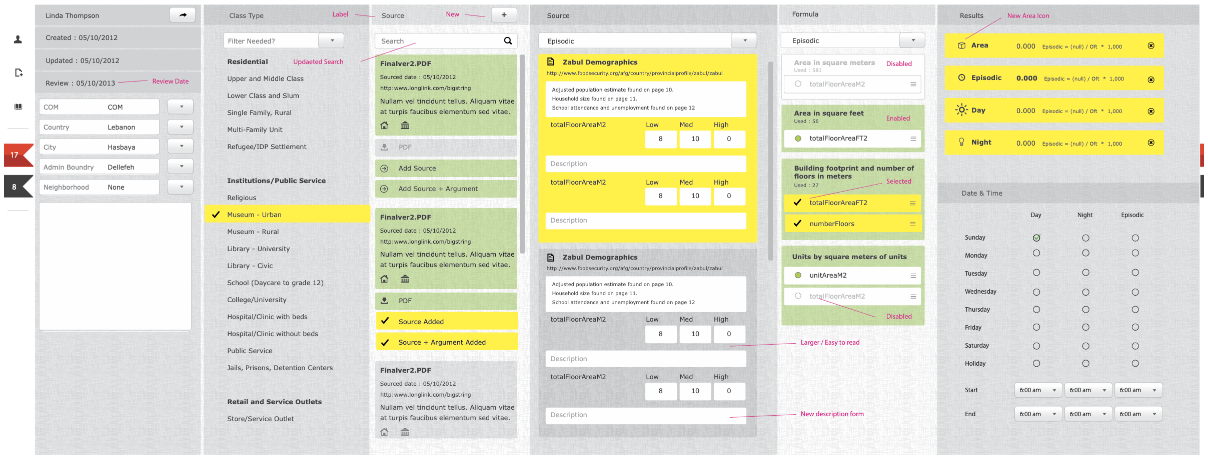
The production CMS UI showing active columns in bright yellow (related data context) and confirmed selections in green. Disabled columns remain greyed out until prerequisites are satisfied, demonstrating the non-linear yet guided workflow.
This custom, non-linear CMS didn’t just solve a data-entry problem—it unlocked the entire completeness system, transforming unpredictable, partial inputs into a transparent, publish-ready dataset.
Challenge to Working with Large Data-Sets
Overall Impact & Outcomes
Flying Circle’s two-part PDT solution has fundamentally transformed ORNL’s population density research. By marrying a non-linear, column-driven CMS with an intuitive, map-centric UI, the GIST team now:
Prepare Data 90% Faster
Through flexible entry lanes and real-time completeness scoring
Uncovers Insights 3× Quicker
With on-demand metrics, visual overlays, and seamless drill-downs
Built-in Data Trust
This platform not only accelerates scientific workflows but also elevates data trust, enabling ORNL to deliver high-precision population studies that drive impactful policy, planning, and research worldwide.
“
Our researchers were spending hours each day navigating between fragmented systems. Flying Circle unified our workflow into a single dashboard, enabling our team to focus on research instead of system navigation.
— Aaron Myers, Group Lead, Oak Ridge National Laboratory
Deployed to 200+ researchers organization-wide
See the success of the Flying Circle approach







See the success of the Flying Circle approach


